Every hearing and client call in one case — and a dated timeline you can check line by line.
Free: 300 minutes a month. Try a 3-minute recording without an account.
- A case folder per client or matter, with case number, court and next hearing date
- Every hearing and call as text in the language spoken, oldest first
- Pro (₹299/month): ask the whole case once — a timeline, contradictions or a client update, each point tied to its recording

Three weeks before the next hearing
Advocate Meera has a property matter with two hearing recordings, a client call in Marathi and a conference with the other side, mostly in Hindi and English. She opens a new case, "Deshmukh vs Patil", adds the case number and the next hearing date, and puts all four recordings in it. The case lists them oldest first. On Pro, she taps "When did ___ first mention…" and asks about the date of the sale deed; the answer names Hearing 1, so she knows exactly which recording to check. Then she taps "Build a timeline" (Pro), exports it as a PDF for her file, and taps "Draft a client update". (An illustration of how the app works, not a real customer.)
Record → ask → get
1 · Open a case
Tap "New case" in your notes. Add the client or matter name, and optionally the case number, court and next hearing date. A case is a folder with these details on top.
2 · Add hearings and calls
Record a client call or upload a hearing, then add it to the case. Free files run up to 100 minutes; Pro takes 2 hours.
3 · Tap a case question (Pro)
In the case, tap "Build a timeline", "List contradictions", "Pull exact quotes", "Draft a client update" or "Hearing summary". Every answer names the recording it came from, and "Export case timeline" saves it as PDF or Word (Pro).
Example
You ask: “When did the witness first mention the date of the sale deed?”
Example answer: "The witness first gave the date as 12 June during cross-examination (Source: Hearing 1, 4 Mar). The client gave the same date on the phone (Source: Client call, 9 Mar)."
You ask: “Build a timeline”
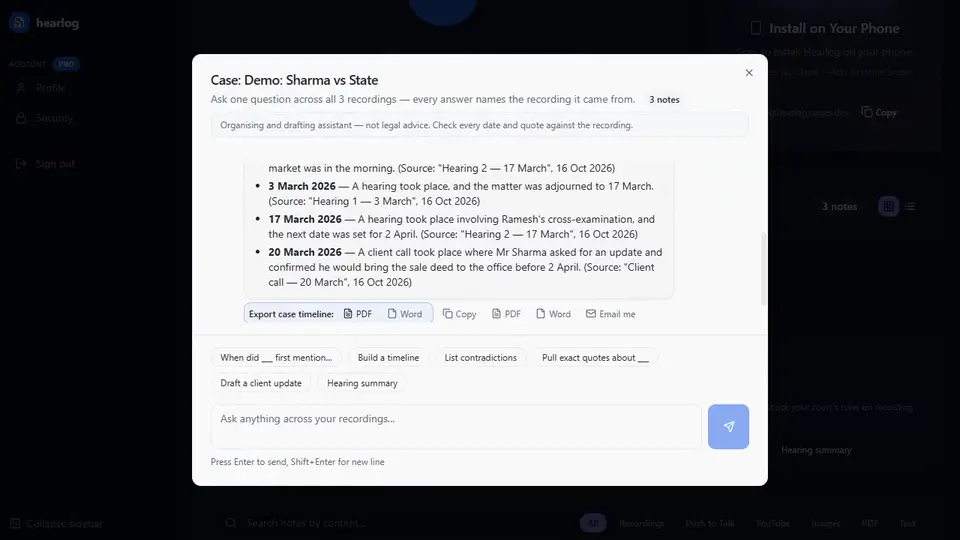
Example answer: "2019: agreement to sell signed (Source: Client call, 9 Mar). 12 June 2020: sale deed registered (Source: Hearing 1, 4 Mar). 2023: legal notice sent (Source: Hearing 2, 17 Mar)."
You ask: “List contradictions”
Example answer: "The witness said the payment was made in cash (Source: Hearing 1, 4 Mar) but later said it was by cheque (Source: Hearing 2, 17 Mar)."
Examples show what chat does with your own recordings; the answers depend on what was said. Always check them against the recording and the record.
See it in the app
 Pro
ProOne case per client, one question across every hearing in it
Each case keeps its hearings, calls and conferences together, in date order, with the next hearing date on top. Ask the case a question and hearlog reads every recording in it and tells you which one each point came from. Cases are folders: the free plan includes 2; Pro gives you as many as you need and lets you ask across all the recordings in a case.
- When did ___ first mention…
- Build a timeline
- List contradictions
- Pull exact quotes about ___
- Draft a client update
- Hearing summary
What Pro adds for a lawyer
- Ask one question across a whole case — every answer names the hearing or call it came from — and export the timeline as PDF or Word.
- As many cases and folders as you need (free: 2).
- Two-hour hearings in one go (free: 100 minutes per file) and unlimited transcription (fair use) (free: 300 minutes a month).
- Upload a batch of recordings at once — up to 10 files, each becomes its own note.
- Pull text out of a judgment PDF or a photo of a notice and keep it with the client's recordings.
Pro is ₹2,990/year (2 months free) or ₹299/month in India ($49/year or $6.99/month elsewhere). The free plan stays free: 300 minutes a month.
Get Pro — ₹2,990/yearSee all 13 things Pro adds
- Chat with your recordings. Ask one recording, several, or a whole folder — every answer names the recording it came from.
- One-tap quiz, flashcards, action items, timeline. Tap once to turn your recordings into a quiz, flashcards, a list of action items or a dated timeline.
- Save a chat answer as Word or PDF, email it, or keep it as a note. Keep a good answer: download it, send it to your inbox, or save it next to your recordings. Answers in Indian scripts download as Word.
- Unlimited — fair use of 20 hours a month, more on request. Stop counting minutes: fair use covers 20 hours of recordings a month (free: 300 minutes) — more on request.
- Files up to 2 hours / 300 MB. Do the whole lecture, hearing or podcast in one go — free files stop at 100 minutes.
- Upload up to 10 files at once, a note for each. Drop a week of recordings in one go and get a finished note for each one.
- Text from a photo, scanned PDF or YouTube video. Turn a whiteboard photo, a scanned judgment or a captioned YouTube video into notes you can translate and summarise.
- Paste up to 50,000 characters to translate and summarise. Translate and summarise a whole chapter or report at once — free text stops at 5,000 characters.
- Email a meeting’s action items to up to 5 people. Send everyone their to-dos straight from the note — no copying and pasting.
- Download the original audio. Keep the recording itself to share or archive, next to its transcript and summary.
- As many folders as you need — including lawyers’ case folders. A folder for every course, client or case — free has 2.
- Case chat for lawyers — timelines, contradictions, client updates. Ask across a client’s hearings and calls: build a timeline, list contradictions, draft a client update.
- SRT subtitles (Pro). Download timed subtitle files (.srt) for your recordings: 4 hours a month.
hearlog is an organising and drafting assistant — not legal advice. It writes down, translates and sorts what was said; you decide what it means. Check every date, quote and draft against the recording and the record, and follow your court's rules on recording.
Questions
Does hearlog give legal advice?
No. hearlog is an organising and drafting assistant — not legal advice. It transcribes, translates and finds things across your recordings, and drafts text such as a client update for you to review. The legal judgement stays with you.
Does it handle hearings in Hindi and English mixed together?
Yes. hearlog writes Hindi-English mixing the way it was spoken and supports every major Indian language — Hindi, Tamil, Telugu, Bengali, Marathi and more — plus 50+ world languages, so a regional-language client call can be read as English notes. Powered by Google Gemini.
Is my clients' information private?
Your recordings and notes are stored encrypted at rest (AES-256, database level) and sent over HTTPS. Each account can open only its own notes. No meeting bot joins your calls — you record or upload yourself. Your own confidentiality and client-consent duties still apply.
Can I record a court hearing?
That depends on the court and the matter. Many courts restrict recording, so check the rules and get permission where needed. hearlog works the same way for client calls, conferences and your own dictated notes, which you can record yourself.
What is a case folder?
A folder made for one client or matter: it holds the client or matter name, and optionally the case number, the court and the next hearing date. Its recordings are listed oldest first, and it has one-tap case questions — a timeline, contradictions, exact quotes, a client update and a hearing summary.
Can I export the timeline?
Yes, on Pro. Under any answer in a case, tap "Export case timeline" and choose PDF or Word. The file carries the case name, its details and a reminder to check every date and quote against the recording. Answers in Hindi or another Indian script are saved as Word, because the PDF fonts cannot draw those scripts yet.
How much is free?
The free plan gives you 300 minutes a month, files up to 100 minutes each, transcripts, summaries, translation and 2 folders or cases. No card. Pro is ₹2,990/year (2 months free) or ₹299/month if you want to ask questions across all the recordings in a case and upload 2-hour hearings.
hearlog
Record or upload free — 300 minutes a month. Transcripts, notes and translation in 50+ languages.
Start freeUpload one client call and see the notes
Free: 300 minutes a month, transcripts, notes and translation. No card.
Try free — no card