Ask a whole week of meetings what you committed to — and get the follow-up email drafted.
Free: 300 minutes a month. Try a 3-minute recording without an account.
- Every meeting as text — in-person, on a call or in the corridor, no bot needed
- Meeting notes with decisions, owners and next steps
- Pro: your action items and open points across all of the week's meetings

Friday afternoon, five meetings later
Rahul, an operations manager in Pune, had a Monday standup, a vendor call, two client reviews and a budget meeting — some in English, some in Hindi and English mixed. He recorded each one on his phone and dropped them in a folder called "Week 42". On Friday he asks the folder for his action items and what is still open. The answer lists each one with the meeting it came from. Then he taps "Draft a follow-up email" for the vendor. (An illustration of how the app works, not a real customer.)
Record → ask → get
1 · Record or upload
Record in the browser during the meeting, or upload the audio from your phone or a call recording. Nothing joins your call. Free files can be up to 100 minutes.
2 · Get meeting notes
Pick "Meeting notes": you get the transcript and notes with decisions, owners and next steps. Translate them into 50+ languages in one tap.
3 · Ask your meetings
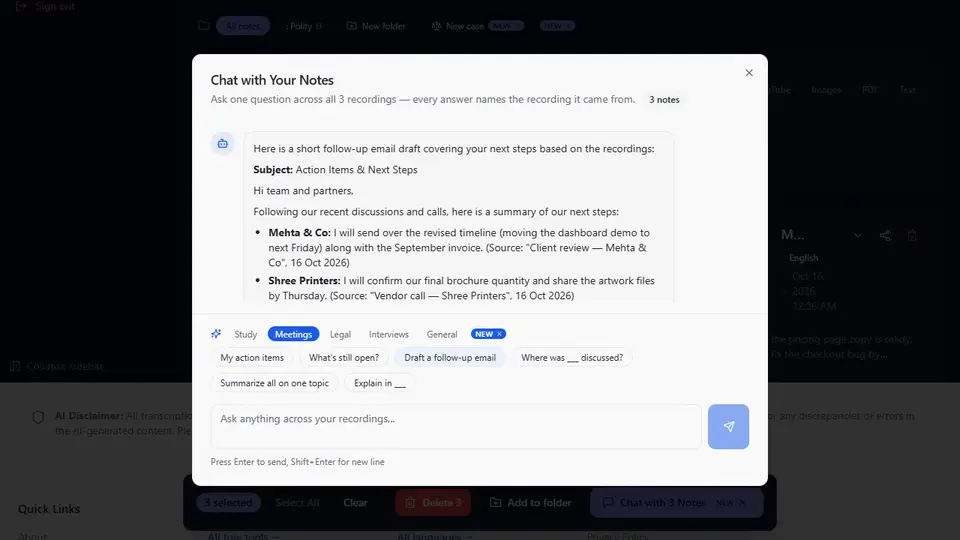
Select the meetings (or a folder) and tap "My action items", "What's still open?" or "Draft a follow-up email". Every answer names the meeting it came from (Pro).
Example
You ask: “My action items”
Example answer: "Send the revised quote to the vendor by Wednesday — asked by Priya (Source: Vendor call, 14 Oct). Share the Q3 numbers with finance (Source: Budget meeting, 16 Oct)."
You ask: “What's still open?”
Example answer: "The delivery date for the second batch was not agreed (Source: Vendor call, 14 Oct). Nobody owns the client training plan yet (Source: Client review, 15 Oct)."
You ask: “Draft a follow-up email”
Example answer: A short email to the vendor listing the decisions from the call, the revised quote you owe, and the open delivery date, ready to edit and send.
Examples show what chat does with your own recordings; the answers depend on what was said in your meetings.
See it in the app
 Pro
ProOne question across a week of meetings
Make a folder for each project, client or week and ask it anything. hearlog reads every meeting in the folder and tells you which one each point came from. The free plan includes 2 folders; Pro gives you as many as you need and lets you ask across them.
- My action items
- What's still open?
- Draft a follow-up email
- Where was ___ discussed, and in which recording?
- Summarize all selected on one topic
- Explain in ___
What Pro adds for a manager
- Ask one question across a week of meetings or a project folder — answers name the meeting.
- Two-hour meetings and workshops in one go (free: 100 minutes per file) and unlimited transcription (fair use) (free: 300 minutes a month).
- Upload a week of recordings at once — up to 10 files, each becomes its own note.
- Email yourself the action items from a meeting.
Pro is ₹2,990/year (2 months free) or ₹299/month in India ($49/year or $6.99/month elsewhere). The free plan stays free: 300 minutes a month.
Get Pro — ₹2,990/yearSee all 13 things Pro adds
- Chat with your recordings. Ask one recording, several, or a whole folder — every answer names the recording it came from.
- One-tap quiz, flashcards, action items, timeline. Tap once to turn your recordings into a quiz, flashcards, a list of action items or a dated timeline.
- Save a chat answer as Word or PDF, email it, or keep it as a note. Keep a good answer: download it, send it to your inbox, or save it next to your recordings. Answers in Indian scripts download as Word.
- Unlimited — fair use of 20 hours a month, more on request. Stop counting minutes: fair use covers 20 hours of recordings a month (free: 300 minutes) — more on request.
- Files up to 2 hours / 300 MB. Do the whole lecture, hearing or podcast in one go — free files stop at 100 minutes.
- Upload up to 10 files at once, a note for each. Drop a week of recordings in one go and get a finished note for each one.
- Text from a photo, scanned PDF or YouTube video. Turn a whiteboard photo, a scanned judgment or a captioned YouTube video into notes you can translate and summarise.
- Paste up to 50,000 characters to translate and summarise. Translate and summarise a whole chapter or report at once — free text stops at 5,000 characters.
- Email a meeting’s action items to up to 5 people. Send everyone their to-dos straight from the note — no copying and pasting.
- Download the original audio. Keep the recording itself to share or archive, next to its transcript and summary.
- As many folders as you need — including lawyers’ case folders. A folder for every course, client or case — free has 2.
- Case chat for lawyers — timelines, contradictions, client updates. Ask across a client’s hearings and calls: build a timeline, list contradictions, draft a client update.
- SRT subtitles (Pro). Download timed subtitle files (.srt) for your recordings: 4 hours a month.
Questions
Does a bot join my meeting?
No. hearlog has no meeting bot. You record the meeting yourself on your phone or laptop, or upload a recording afterwards. That means it works the same for in-person meetings, phone calls and video calls, and nobody sees an extra participant.
Is my meeting data private?
Your recordings and notes are stored encrypted at rest (AES-256, database level) and sent over HTTPS. Each account can open only its own notes. No meeting bot joins your calls. Let people know before you record, and follow your company's policy.
Does it work for meetings in Hindi and English?
Yes. hearlog writes Hindi-English mixing the way it was spoken and supports every major Indian language — Hindi, Tamil, Telugu, Bengali, Marathi and more — plus 50+ world languages. Powered by Google Gemini.
How do I find my action items across meetings?
Put the meetings in a folder, or select them, and tap "My action items" or "What's still open?". hearlog lists each item with the meeting it came from. Asking across recordings is a Pro feature.
How much is free?
The free plan gives you 300 minutes a month, files up to 100 minutes each, meeting notes, translation and 2 folders. No card. Pro is ₹2,990/year (2 months free) or ₹299/month if you want to ask questions across your meetings.
hearlog
Record or upload free — 300 minutes a month. Transcripts, notes and translation in 50+ languages.
Start freeRecord your next meeting and see the notes
Free: 300 minutes a month, meeting notes and translation. No card.
Try free — no card